Sync your GitHub Repository with Hashnode - A Practical Foundation
End-to-end workflow for writing locally, versioning posts, and auto-publishing to Hashnode

Introduction
Managing your blog content as code brings version control, reviews, automation, and repeatability. Hashnode supports GitHub-powered publishing: you push Markdown files with special front matter, Hashnode ingests them, and your post appears (or updates) automatically.
This article is a reference point for who wants to manage a solid process flow in their Hashnode blogging solution. It explains structure, metadata, safe workflows, and an alternative asset hosting via GitHub Pages (for body images only) so you avoid accidental duplicate posts or broken slugs while keeping images portable.
Process Flow
Below is the end-to-end process from local authoring to publication:
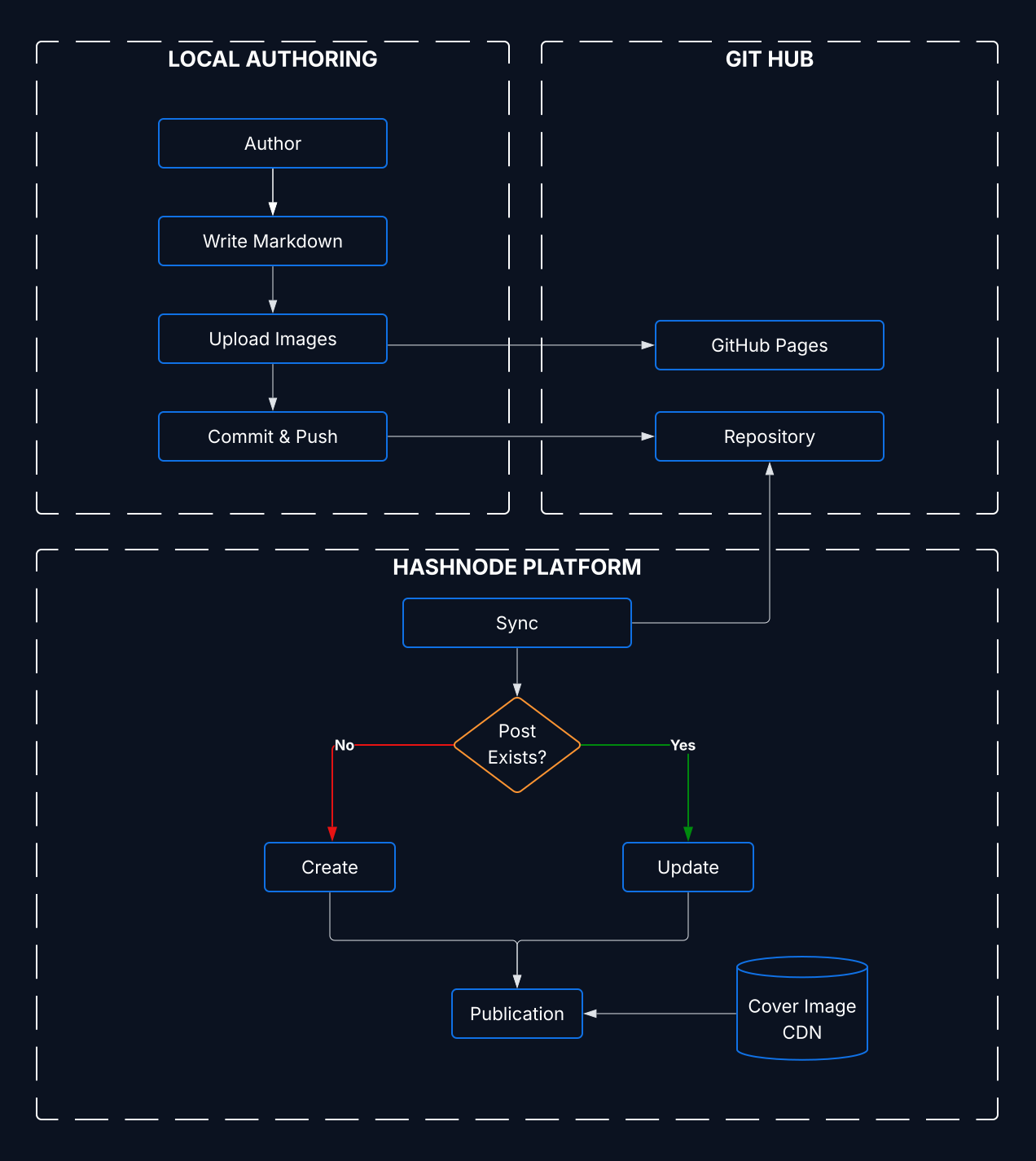
Key stages:
- Author locally using Markdown (with valid front matter) and any images.
- Commit & push to the connected repository branch.
- Hashnode sync service polls / is triggered and parses front matter to qualify the post.
- If slug already exists (same path or moved) → update; otherwise → create.
- Publication updated; cover image is served from Hashnode CDN; optional post assets can live on GitHub Pages.
Requirements
- Hashnode account + publication (or personal blog).
- A GitHub repository (public or private; if private you must grant access during setup).
- Each post: a
.mdfile with valid front matter section--- ... ---preceding body content.
GitHub Repository Structure
You can organize posts in dated folders (e.g. 2025/first-post.md) or topical folders. The path participates in update logic: changing ONLY the path updates existing post; changing BOTH path and slug produces a new post. In this example structure I'm partitioning by year but you may further partition based on the overall post distribution over time or another dimension relevant to your project.
Example:
/2025/
  hashnode.md   # this article
  another-post.md
/assets/        # optional local image sources for body (NOT cover)
Hashnode Post Definition
In this section we walk thought the elements required to author a valid post for Hashnode ingestion and how we use different parameters to manage the post-flow.
Front Matter Essentials
Required fields: title, slug, tags, domain.
Optional but useful:
subtitle(teaser under title)cover(MUST be a URL from the Hashnode image uploader/CDN ONLY)saveAsDraft: true(keep unpublished until review)enableToc: true(auto table of contents)ignorePost: true(skip ingestion; keep file in repo)canonical(if cross-posting from original source)publishAs(team publications)
Refer to the public instruction spec (hashnode authoritative documentation at the moment I write this post): instructions.txt
Slug & Update Rules
Hashnode identifies posts with a combination of slug + path behavior:
- Same
slug, same (or moved) path => update existing post. - Change ONLY slug => existing post updated to new slug (old URL handled by Hashnode redirect logic).
- Change ONLY path => post updated; slug stays stable.
- Change BOTH slug & path => treated as NEW post (original remains unless deleted manually in dashboard).
Draft Workflow
- Start with
saveAsDraft: truewhile iterating. - Remove the line (or set
false) when ready to publish. - Subsequent edits (without re-adding
saveAsDraft) update the live post.
Ignoring a File
Set ignorePost: true to prevent ingestion (useful for templates, notes, or WIP outlines). Remove or set to false later to activate.
Tags
Provide up to 5 valid tag slugs (lowercase). They influence discovery. Research tag list (Hashnode support repo) before finalizing. Avoid stuffing unrelated tags.
Suggested Authoring Flow
- Copy the instruction spec contents into a new file as a starting template.
- Fill required metadata (upload cover immediately to avoid forgetting).
- Decide body image hosting; add assets accordingly.
- Write content; commit (e.g.,
feat(post): add hashnode sync foundation article). - Review via PR (optional).
- Merge & push; verify post + images.
- Iterate; optimize SEO fields.
Minimal Template
---
title: Your Title Here
slug: your-slug-here
tags: hashnode, github
domain: your-domain.hashnode.dev
cover: https://cdn.hashnode.com/res/hashnode/image/upload/...
saveAsDraft: true
---

# Heading
Content...
Common Pitfalls
| Pitfall | Fix |
| Non-Hashnode cover image | Re-upload cover via Hashnode uploader |
| Forgot required field | Add title, slug, tags, domain |
| Duplicate post created | Changed both slug & path; revert or delete old one manually |
| Post not updating | Verify sync connection; ensure no ignorePost: true; push to monitored branch |
| Broken body image URL | Confirm host deployment; check path & casing |
| Oversized repo due to images | Optimize/compress before committing |
Images & Media
When managing media we must make a distinction between the cover of our post:
- Cover Image: MUST come from Hashnode's uploader (https://hashnode.com/uploader). Hashnode requires cover images to be served from its own CDN.
- Post Images: May use either Hashnode CDN (recommended for simplicity) OR any publicly accessible, reliable external host (e.g. GitHub Pages). External body images allow version control and custom domains, but you must self-optimize them.
Referencing Images in your Post
- Hashnode CDN:
 - GitHub Pages:
 - Custom Pages domain:
after DNS + Pages config.
Always include descriptive alt text for accessibility and SEO.
Choosing Hosting Options
| Criterion | Hashnode CDN | GitHub Pages |
| Ease of use | Simplest | Requires Pages setup |
| Version control of images | No | Yes |
| Auto optimization | Yes | No (manual) |
| Custom domain | Via blog domain | Yes (CNAME) |
| Renaming risk | Low | Medium (path changes) |
| Large asset handling | Optimized | Manual care |
GitHub Pages Setup
Full official guide available at this link: GitHub Pages Quickstart
I would highly recomment this option if you want to keep your images versioned alongside your posts and avoid relying on third-party image hosts that may change policies or go down. Follow these key steps to manage the setup:
- Branch Strategy: Serve from
mainroot or/docsfolder. - Create
assets/folder; commit images (avoid very large originals—optimize first). - Enable Pages: Settings > Pages > "Deploy from a branch" (select branch + folder) > Save.
- (Optional) Custom domain + CNAME + DNS (add CNAME file + DNS record).
- Wait for deployment; verify an asset URL loads.
- Embed URLs in your Markdown body.
Directory Example
/2025/hashnode.md
/assets/2025/image-1.svg
/assets/2025/image-2.svg
Conclusion
With this structure, blogging becomes repeatable and auditable. Posts are code; reviews catch errors early; publishing is a push away. My future articles will build on this baseline.
Happy writing!
About the author
With over ten years of experience in the full software development lifecycle, I specialize in scalable and high-performance cloud architectures, delivering solutions that go beyond simple programming. As co-founder and Senior Architect at Cloud Ninja, I am committed to innovation and to building cloud infrastructures that optimize business and simplify operations. Leveraging the latest Microsoft and Azure technologies, I design and implement solutions that are flexible, secure, and future-ready, always ensuring the best possible outcome to help clients’ businesses grow.
Comments
Join the discussionNo comments yet. Be the first to comment.